> ## Documentation Index
> Fetch the complete documentation index at: https://docs.verloop.io/llms.txt
> Use this file to discover all available pages before exploring further.
# Smart Interruption
> Let your Voice AI Agent distinguish real interruptions from acknowledgements and noise, and resume from where it left off.
**Smart Interruption** makes your **Voice AI Agent** handle overlapping speech the way a good human agent would. It ignores background noise, takes a quick *"haan"* or *"ok"* as encouragement to keep going, and stops instantly when the caller genuinely interrupts. Most importantly, once interrupted, the agent **remembers that it was cut off** — so its next turn answers what the caller asked instead of repeating a message the caller never heard.
You can enable Smart Interruption for each Voice Recipe under **General Settings → Advanced**.
## How It Works
Whenever the caller makes a sound while the agent is speaking, Smart Interruption classifies it as background noise, an acknowledgement, or a genuine interruption — and reacts accordingly.
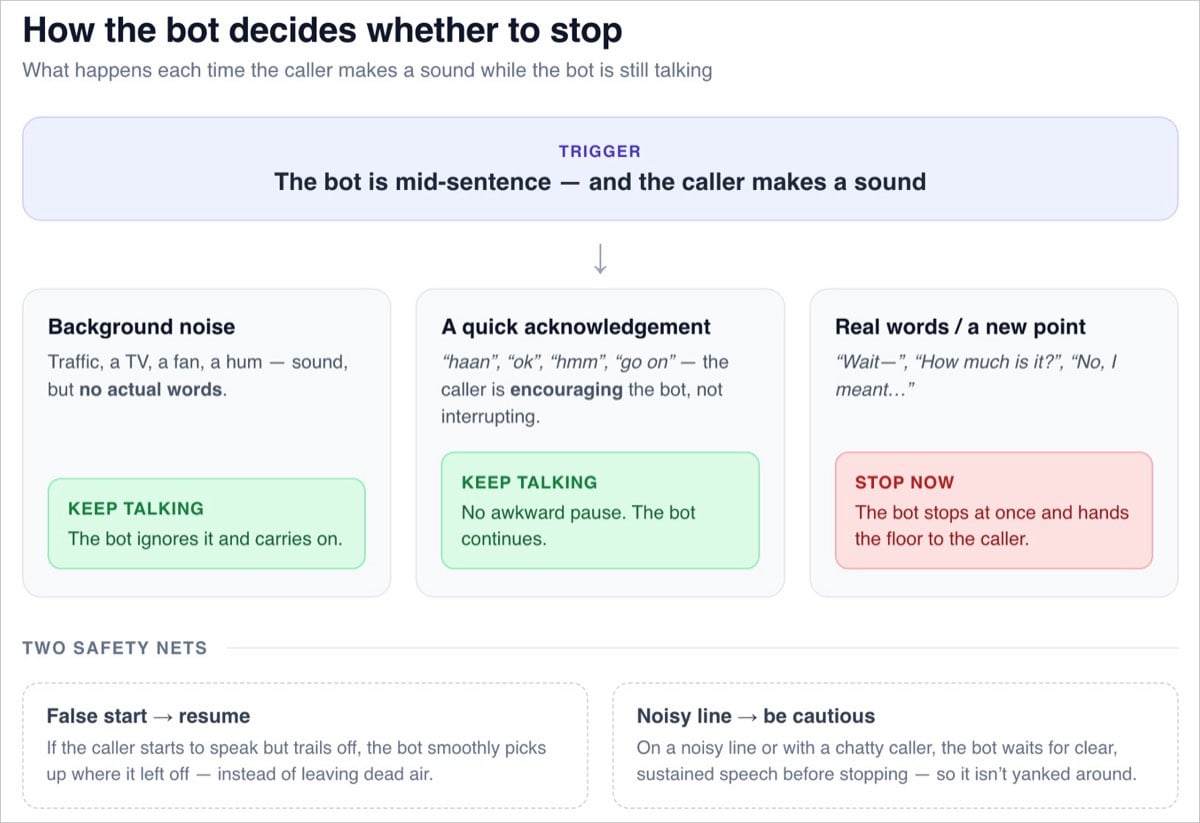 | When the caller... | The agent... |
| ------------------------------------------------------------------------------- | ------------------------------------------------------------------------------------------- |
| Is on a noisy line (traffic, TV, a fan) but isn't speaking | Keeps talking — background noise isn't speech, so it doesn't cut the agent off. |
| Says a short acknowledgement — *"haan"*, *"ok"*, *"hmm"*, *"go on"* | Keeps talking, with no awkward pause. The caller is encouraging the agent, not taking over. |
| Starts like an acknowledgement but continues — *"haan, lekin..."* (yes, but...) | Keeps talking for a beat, then stops as soon as it's clear the caller is making a point. |
| Genuinely cuts in — *"Wait—"*, *"How much is it?"*, *"No, I meant..."* | Stops immediately and hands the floor to the caller. |
| Starts to speak, then trails off (a false start) | Picks up smoothly from where it left off, avoiding dead air. |
| Is on a very noisy line, or keeps half-interrupting | Becomes more cautious — waits for clear, sustained speech before stopping. |
**Acknowledgements are language-aware.** The list of "encouraging" words (*"haan"*, *"ok"*, *"achha"*, *"yes yes"*...) follows the language the call is being conducted in — so the behavior stays natural for **Voice AI Agents for Indian Languages**, **Voice AI Agents for Arabic**, English, and every other supported language.
## No More Repeating Itself
After a genuine interruption, the agent continues from the point the caller actually heard. It treats the cut-off part of its reply as never delivered, so it responds to what the caller said instead of re-reading its earlier message.
**Example:**
* **Agent:** "Our Premium plan includes 24×7 support, free delivery, and priority—" *(caller cuts in)*
* **Caller:** "How much is it?"
* **Agent:** "It's ₹999 a month."
The agent knows the caller only heard the first few words, so it simply answers the question — instead of repeating the entire pitch and answering the actual question last.
## Enabling Smart Interruption
Open your Voice Recipe and navigate to **General Settings**.
Select the **Advanced** tab, alongside settings like **Voicemail Management** and **Background Sound**.
Enable the **Smart Interruption** toggle. The agent will now distinguish real interruptions from acknowledgements and noise, pausing briefly when the caller speaks and resuming from where it left off unless it's a genuine interruption.
If your callers are often on noisy lines, enable **Caution on noisy lines**. The agent becomes more conservative about stopping — it waits for clear, sustained speech before yielding, so it isn't yanked around by chaotic audio.
### Settings Reference
| Setting | What it does |
| -------------------------- | ----------------------------------------------------------------------------------------------------------------------------------------------------------------------------------------------- |
| **Smart Interruption** | On/off. Distinguishes real interruptions from acknowledgements and noise. The agent pauses briefly when the caller speaks, resuming from where it left off, unless it's a genuine interruption. |
| **Caution on noisy lines** | Controls how quickly the agent becomes conservative about stopping when the line is noisy or the caller keeps half-interrupting. |
## Reviewing Interruptions in Transcripts
Interrupted agent replies are visible in the conversation transcript:
* **"Interrupted" tag:** Any agent reply that was cut off carries a clear tag in the transcript.
* **The unspoken portion:** Reviewers can see the part of the agent's reply that the caller never heard, so transcripts reflect the real conversation.
Smart Interruption governs *how* the agent reacts when interruptions are allowed. If a block has [Barge-in](./recipe-block/ask-block#barge-in-interruptions) disabled — for example, for compliance statements — the agent always finishes speaking in that block, regardless of this setting.
| When the caller... | The agent... |
| ------------------------------------------------------------------------------- | ------------------------------------------------------------------------------------------- |
| Is on a noisy line (traffic, TV, a fan) but isn't speaking | Keeps talking — background noise isn't speech, so it doesn't cut the agent off. |
| Says a short acknowledgement — *"haan"*, *"ok"*, *"hmm"*, *"go on"* | Keeps talking, with no awkward pause. The caller is encouraging the agent, not taking over. |
| Starts like an acknowledgement but continues — *"haan, lekin..."* (yes, but...) | Keeps talking for a beat, then stops as soon as it's clear the caller is making a point. |
| Genuinely cuts in — *"Wait—"*, *"How much is it?"*, *"No, I meant..."* | Stops immediately and hands the floor to the caller. |
| Starts to speak, then trails off (a false start) | Picks up smoothly from where it left off, avoiding dead air. |
| Is on a very noisy line, or keeps half-interrupting | Becomes more cautious — waits for clear, sustained speech before stopping. |
**Acknowledgements are language-aware.** The list of "encouraging" words (*"haan"*, *"ok"*, *"achha"*, *"yes yes"*...) follows the language the call is being conducted in — so the behavior stays natural for **Voice AI Agents for Indian Languages**, **Voice AI Agents for Arabic**, English, and every other supported language.
## No More Repeating Itself
After a genuine interruption, the agent continues from the point the caller actually heard. It treats the cut-off part of its reply as never delivered, so it responds to what the caller said instead of re-reading its earlier message.
**Example:**
* **Agent:** "Our Premium plan includes 24×7 support, free delivery, and priority—" *(caller cuts in)*
* **Caller:** "How much is it?"
* **Agent:** "It's ₹999 a month."
The agent knows the caller only heard the first few words, so it simply answers the question — instead of repeating the entire pitch and answering the actual question last.
## Enabling Smart Interruption
Open your Voice Recipe and navigate to **General Settings**.
Select the **Advanced** tab, alongside settings like **Voicemail Management** and **Background Sound**.
Enable the **Smart Interruption** toggle. The agent will now distinguish real interruptions from acknowledgements and noise, pausing briefly when the caller speaks and resuming from where it left off unless it's a genuine interruption.
If your callers are often on noisy lines, enable **Caution on noisy lines**. The agent becomes more conservative about stopping — it waits for clear, sustained speech before yielding, so it isn't yanked around by chaotic audio.
### Settings Reference
| Setting | What it does |
| -------------------------- | ----------------------------------------------------------------------------------------------------------------------------------------------------------------------------------------------- |
| **Smart Interruption** | On/off. Distinguishes real interruptions from acknowledgements and noise. The agent pauses briefly when the caller speaks, resuming from where it left off, unless it's a genuine interruption. |
| **Caution on noisy lines** | Controls how quickly the agent becomes conservative about stopping when the line is noisy or the caller keeps half-interrupting. |
## Reviewing Interruptions in Transcripts
Interrupted agent replies are visible in the conversation transcript:
* **"Interrupted" tag:** Any agent reply that was cut off carries a clear tag in the transcript.
* **The unspoken portion:** Reviewers can see the part of the agent's reply that the caller never heard, so transcripts reflect the real conversation.
Smart Interruption governs *how* the agent reacts when interruptions are allowed. If a block has [Barge-in](./recipe-block/ask-block#barge-in-interruptions) disabled — for example, for compliance statements — the agent always finishes speaking in that block, regardless of this setting.