

How It Works
Whenever the caller makes a sound while the agent is speaking, Smart Interruption classifies it as background noise, an acknowledgement, or a genuine interruption — and reacts accordingly.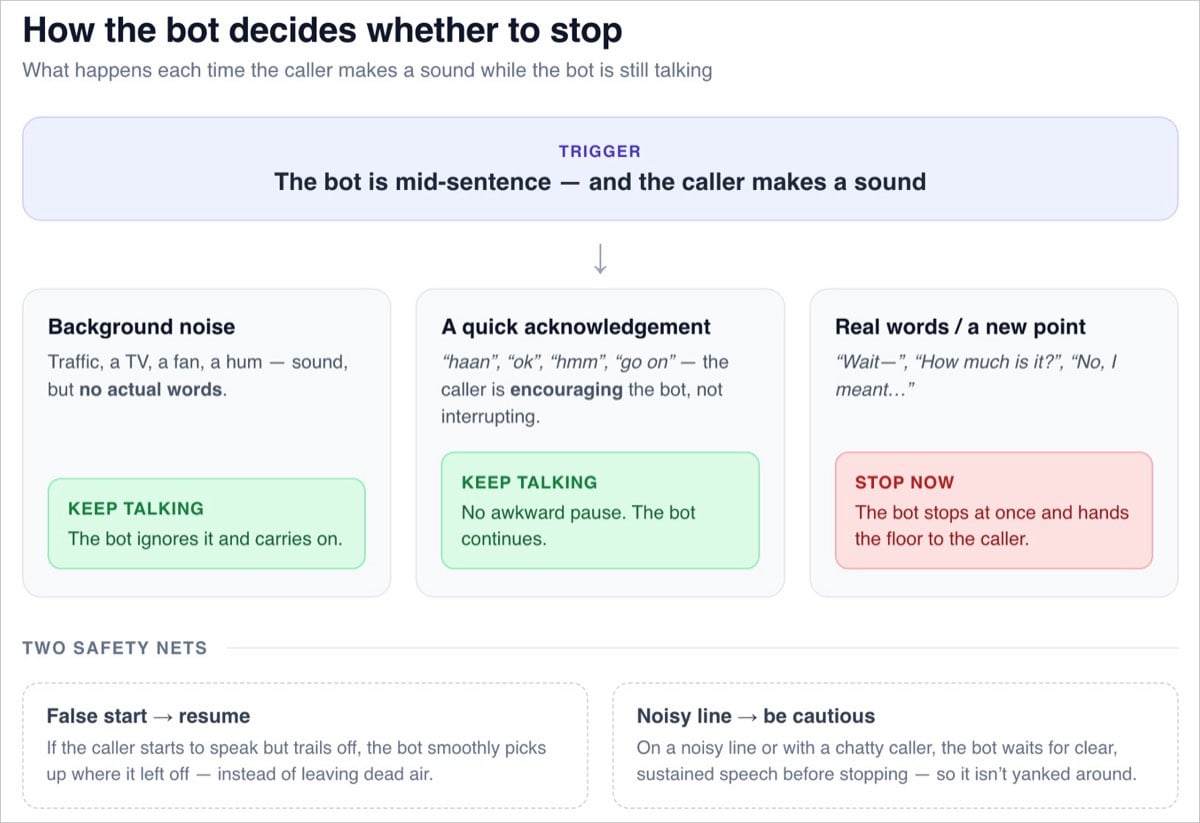
No More Repeating Itself
After a genuine interruption, the agent continues from the point the caller actually heard. It treats the cut-off part of its reply as never delivered, so it responds to what the caller said instead of re-reading its earlier message. Example:- Agent: “Our Premium plan includes 24×7 support, free delivery, and priority—” (caller cuts in)
- Caller: “How much is it?”
- Agent: “It’s ₹999 a month.”
Enabling Smart Interruption
1
Open General Settings
Open your Voice Recipe and navigate to General Settings.
2
Go to the Advanced tab
Select the Advanced tab, alongside settings like Voicemail Management and Background Sound.
3
Toggle Smart Interruption on
Enable the Smart Interruption toggle. The agent will now distinguish real interruptions from acknowledgements and noise, pausing briefly when the caller speaks and resuming from where it left off unless it’s a genuine interruption.
4
Optional: Enable Caution on Noisy Lines
If your callers are often on noisy lines, enable Caution on noisy lines. The agent becomes more conservative about stopping — it waits for clear, sustained speech before yielding, so it isn’t yanked around by chaotic audio.
Settings Reference
Reviewing Interruptions in Transcripts
Interrupted agent replies are visible in the conversation transcript:- “Interrupted” tag: Any agent reply that was cut off carries a clear tag in the transcript.
- The unspoken portion: Reviewers can see the part of the agent’s reply that the caller never heard, so transcripts reflect the real conversation.
Smart Interruption governs how the agent reacts when interruptions are allowed. If a block has Barge-in disabled — for example, for compliance statements — the agent always finishes speaking in that block, regardless of this setting.